Commands
- skinparam COLOR STYLE
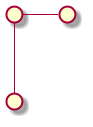
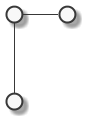
- skinparam monochrome true
- skinparam monochrome reverse
- skinparam handwritten true
- Both lines handwritten and monochrome can be used together.
- rectanglebackgroundcolor white
- notebordercolor green
- Arrowcolor
- nodesep 100 : To separate nodes
- skinparam SHADOW STYLE
- skinparam shadowing false
- – : Draw a line
- -[hidden]–> : Draw a hidden line
- -right–> : Left to right arrow from one object to another
- .. [Double dots] : Dashed line
- -[dashed]- : Dashed line
- cp1 -[#black]down-> im : Choose color while drawing an arrow
- Objects:
- () : Draw a circle
- () “TEXT” as ALIAS
- rectangle : Draw a rectangle
- rectangle “Intermediary” as im #Gold : Rectangle in color gold
- actor
- actor “Sad User” as user
- participant
- Rectangular block of participant
- boundary
- artifact
- control
- entity
- database
- collections .
- () : Draw a circle
- title : Title text2. ove diagram
- caption : Caption below the diagram “\n” used sometimes to create gap between the diagram and the caption.
- like tags used inside text to slant text.
- note
- note DIRECTION of ANY_OBJECT “TEXT”
- scale
- scale 800 width: to scale image size to 800 width
- direction
- left to right direction: To specify the flow of arrows for ease of use later.
- together
- together{ block1 block2 } : To show some blocks together as a group.
- Comments
- ’ [Quote] : For single line comment
- /’ [Slash + Quote] : For multi line comment
- Description to arrows
- Object1 -> Object2 : TEXT ==> For giving comments to arrows
- listopeniconic
- This command shows all icons that can be used in plantuml. e.g. cloud, code etc.
- <&code> <&pie-chart> are some examples of how to use them.
- colors
- List all available colors
- Text formatting
- * * : For bold
- // / / : For italics
- "" "" : For monospaced
- – – : For stroked
- _ _ _ _ : For underline
- ~ ~ ~ ~ : For waved
- Numbered list:
- # for item. # # for subitem and so on.
- Unnumbered list:
- * for item. * * for subitem and so on.
- ~ is used as escape for formatting characters.
- = TEXT : For heading 1
- == TEXT : For heading 2 and so on.
- Trees can be made, legacy HTML can be used to create objects and more to go.
Examples
References
https://github.com/mattjhayes/PlantUML-Examples/blob/master/README.md